01
An SSH connection manager.
Save VPS profiles, import supported hosts from your SSH config, and connect with a password, private key, or SSH agent.

Latest release for your Mac.
Apple Silicon
A small app. A little more focus.
shessh is a lightweight, native SSH client for macOS.
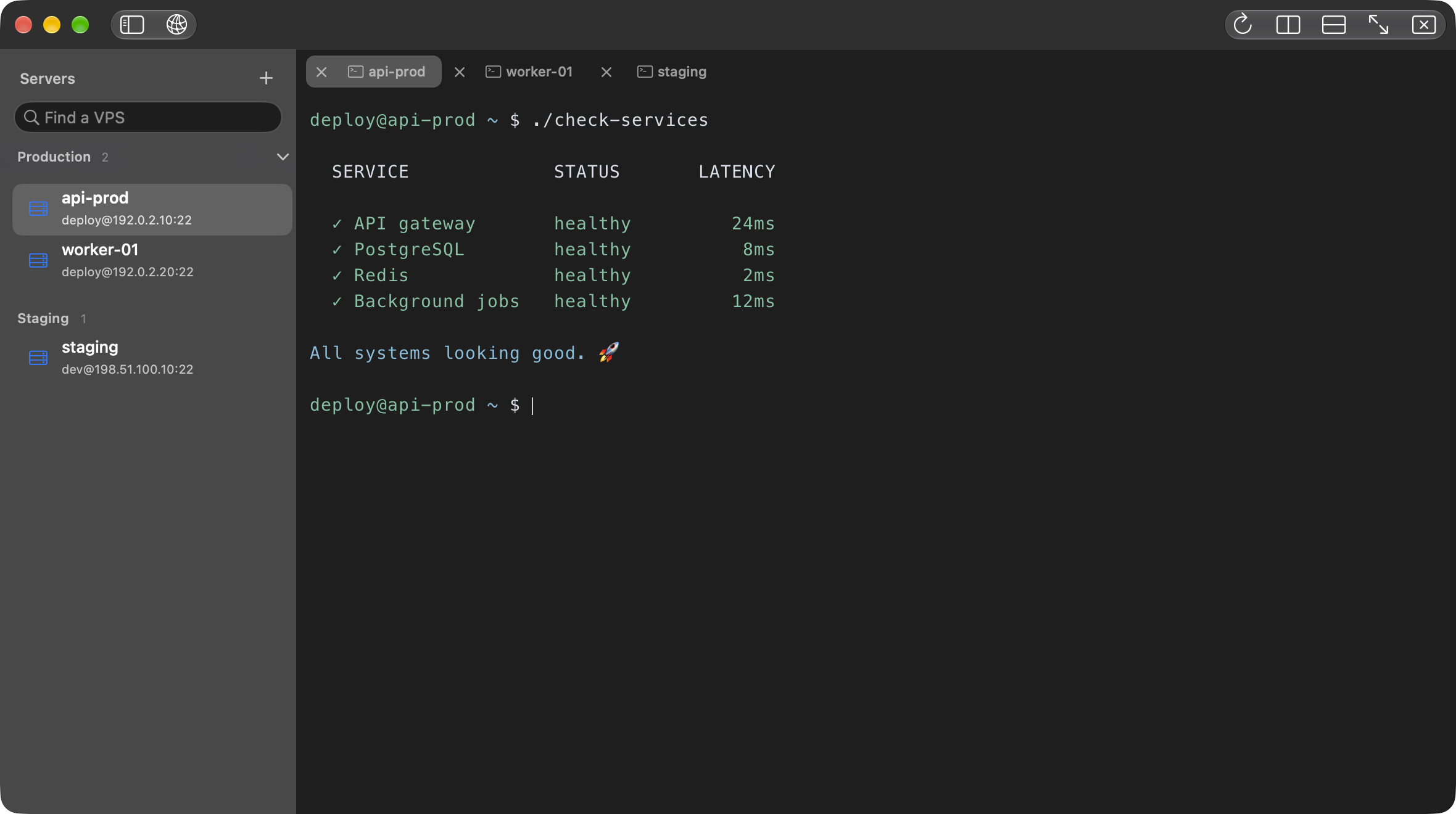
Manage VPS connections with tabs, split panes, and Keychain security.
Native to macOS · No account. Ever.
Made for the everyday rhythm of working
with servers. Thoughtful where it counts.
Save VPS profiles, import supported hosts from your SSH config, and connect with a password, private key, or SSH agent.
Move between sessions in tabs, or open a split to keep two servers in view. Your workspace, at your pace.
Profiles stay on your Mac. Credentials belong in Keychain. Host verification is part of every connection.
Built with AppKit, a C core, and Metal rendering. Familiar controls, keyboard-first interactions, and the little details that make a Mac app feel like a Mac app.
Built for macOS. Private by default.Real measurements from the native app.
Three fresh runs. Synthetic data. No remote servers.
Apple M5 · 16 GiB RAM · macOS 27.0Release benchmark build · 18 Sep 2026
Whole app totals, not memory per tab. Median and range across three runs.
Each session receives 2,500 lines of Unicode, emoji, and ANSI output through a local PTY. Tabs are visited in sequence; the split test follows the eight-tab cycle.
Physical footprint is the app’s macOS memory accounting; RSS measures resident memory. They are separate measurements, not numbers to add together. Child shells and WindowServer are excluded.
Two earlier 10-minute stress runs processed 300,050 lines each. Footprint stayed within the preset limits in both; the first run failed the RSS trend limit, and the repeat passed all checks.
Three fresh Release processes, run sequentially without sanitizer or leak instrumentation. Initial window: 1180 × 720 points at 2×. Memory is sampled after output completes; these are workload snapshots, not peak-memory claims. The numbers above are medians; PTY latency is the median of three per-run p95 values.
ASCII throughput ranged from 22.0 to 23.7 MiB/s. Local PTY p95 ranged from 0.133 to 0.144 ms. After closing eight tabs, median footprint was 116.8 MiB; cached memory does not immediately return to the empty-window baseline.
Two runs on the same machine, also on 18 September. One terminal, approximately 500 lines/second, CJK and emoji glyph churn, 120-second warmup, and one sample/second. Both completed GPU submissions throughout the measured intervals. This longer workload is separate from the short benchmark above.
| Run | RSS trend | Footprint trend | Result |
|---|---|---|---|
| First run | 1.70 | -0.31 | Failed RSS trend |
| Repeat | -0.94 | 0.18 | Passed all limits |
Preset limits for both metrics: median growth ≤16 MiB, linear trend ≤1 MiB/minute, and p95–p05 spread ≤64 MiB. The limits were unchanged between runs. These results do not establish hours-long stability or a leak-free app.
One machine and synthetic local workloads; results vary with terminal size, output, cache state, and desktop activity. There is no comparison with another SSH client. Native runs logged a PTY SIGHUP warning during teardown and completed successfully.
The report and measured data are available below. With source access, reproduce the workloads using make benchmark and make memory-soak. The JSON includes individual samples, environment, and a source fingerprint for the short benchmark.
No account. No tracking. No cloud between you and your servers.
Version 1 is here.
Here’s what we’re planning for version 2.
A native workspace for everyday work with your servers. Available now.
Connect with a password, private key, or SSH agent.
Organize your servers and import SSH config settings.
Keep independent sessions side by side.
Store credentials securely, with Unicode and emoji support.
Bring file transfers into the same workspace as your SSH sessions.
Browse remote files and folders alongside your terminal.
Upload and download files between your Mac and server.
Create folders, rename files, and remove what you no longer need.
Follow transfers, cancel a task, and retry failed uploads.
Planned for version 2. Release date to be announced.
Here’s what to expect.
shessh is an SSH client built specifically for macOS. It brings saved server profiles, SSH sessions, tabs, and split panes into a native AppKit application, with a C core and a Metal terminal renderer.
Check the download button above for the latest release.
Yes. Import supported host settings from ~/.ssh/config, or choose another config file. You can also select a private key directly. Import creates a saved profile, rather than a live link to the config. Advanced directives such as ProxyJump and Match are not supported yet.
Add a VPS profile with your hostname or IP address, port, and username. Choose a password, private key, or SSH agent, then connect. For a new host, review and verify its fingerprint before trusting it. Your SSH session opens in a terminal tab.
SFTP is planned for version 2, including remote file browsing, drag-and-drop transfers, and file management. Version 1 provides SSH terminal sessions. The roadmap shows what is released and what is planned.
No account, telemetry, or cloud sync is required. Server profiles are stored locally and saved credentials use macOS Keychain. This website also uses no analytics or tracking cookies.
No. This is an animated preview captured from the native app using fictional server profiles and scripted example output. It does not accept input or connect to a server.
The download details list the minimum macOS version for the current Apple Silicon release.
Use Shessh Support on GitHub. Start a Discussion for questions and troubleshooting, or open an Issue for confirmed bugs with steps to reproduce. Open support.
Your next SSH session deserves a nicer place.
Open the DMG, then drag shessh into Applications.